5:50




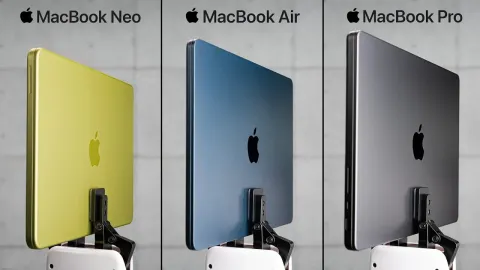
- Stop overpaying for tech. Who wants to spend $3,000 on a brand new laptop or $1,000 for a brand new phone? So today, we're gonna be going through a series of different budget versus flagship devices to see what's actually worth it. - [Alex] Yeah, and all the comparisons should have roughly equivalent performance. - So when it comes to comparing laptops, I think it's a pretty straightforward comparison to take something like MacBook Neo, a brand new specifically budget-oriented MacBook, compared to this, an M2 MacBook Air. Okay, pros and cons here, right off the rip, they're actually super similar, right?
Shouldn't be a huge surprise. Both have, I would say, broadly similar displays, keyboards are very similar. Generally speaking, newer devices are gonna have more software support, so this will probably get updates for longer. But if you get an older device with something like more RAM, it might feel better for longer, which is different than just pure software support. So the spec here is this is a MacBook Neo, this is a 512 gig version, but it's the same. So the MacBook Neo, there's only two options besides color, 256 or 512, you can't change the RAM or anything. So like performance-wise, it's gonna be the same.
This is an M2 Air, but this is an upgraded model, right? - [Alex] Yes, it is. - [Austin] So this is 16 gigs of RAM, 512 gigs of storage. - [Alex] Yeah. - Ooh, I mean, I would lean toward a MacBook Air if they're around the same price, just because if you can find one of these with 16 gigs of RAM, yeah, you're right, it's not gonna have software support for as long, but that's gonna feel much more usable, right? 16 gigs of RAM with macOS is enough for basically everybody, right?
I mean, you can edit, you can do whatever you want. When it comes to the used market, as we've looked at many times in videos before, the quality levels vary based on where you buy them from. The prices are all over the place, you buy from eBay, you buy from something like Back Market. Broadly speaking, what is an M2 Air with like 16 gigs of RAM run? - [Alex] So it is highly variable, but I would say, on average, you could find one between 5 and $600. - Ooh, so cheaper than the MacBook Neo?
- [Alex] It will most likely be slightly cheaper. - Here's the thing, if Apple raised all the prices, by the time this video goes live, they might have already done it, if they raise the price in new devices, typically, it brings used prices up along with it. So it's still, I think, broadly equivalent. All right, round one, I'm gonna have to go with the MacBook Air. It's time to go with the flagship. I mean, both are good options though. I will say, like you can't go wrong between these two, but the thing is, Apple silicon is so good that even going a few generations old still feels fantastic.
Next up, we have headphones? Alex, I got to ask, when we were talking about this, you mentioned you wanna do headphones, I assumed you're going to pick like AirPods or something simple. So you went with Sony. - [Alex] Yeah. AirPods, I feel like would have been a little bit too straightforward, kind of like a the phones where it's like- - Buy new AirPods, they're like 100 bucks on sale, like whatever. - [Alex] This is the cheapest like wireless headphone that Sony makes that has active noise canceling. - Okay, so what do these run, like what's the general price on these guys?
- [Alex] These headphones retail for $170. We got them on a fantastic sale- - Yeah. - [Alex] For like around $90. - So not a lot in the box, just USB-C to A and an aux, and then the headphones themselves. They're very lightweight, a little plasticky. We do have nice physical buttons, so you have your power button, you have your volume, you have your noise cancellation. I do like physical buttons. As far as the flagship, these are 1000XM4s? - [Alex] 3s. - M3s? - [Alex] Yes, so again, this is kind of a little bit subjective, but I think that the XM3s are kind of like the hallmark.
I think like these were like the most iconic when they first came out. - What the heck are M3s worth at this point? - [Alex] The ones that like are not just completely gross, broken, cracked, whatever, I think you could find a pretty decent pair of these for around $100. - So basically the same, okay, so then, interesting. So this is now the same price, so you really actually just get to decide, do you want the older flagship or the newer budget? I mean this is the most straightforward version of the comparisons we've done yet. So first test with any pair of noise-canceling headphones, how good is the Transparency mode? So I'm gonna switch over, so Transparency.
- [Alex] Ah, ah, ah. This is me not being very transparent, but being very, very loud. - They're fine. - [Alex] Okay. - [Austin] Let's try the noise canceling. - [Alex] Hey, we're making noise now. - [Adriana] Ah, ah, ah. This is me being Alex a few seconds ago. - [Alex] Excuse me? - Honestly, it's actually not bad. The noise cancellation is, I would say, acceptable. For 100 bucks, I'm not mad about that.
Out of the box with no tuning, there's a lot of bass and it's a little muddy, right? It's very like kinda you're losing a lot of the detail. I switched over to Bright, which is better, it definitely kinda helps to pull more out of the music. They're fine, but they're not fantastic. I'm excited to try the M3s though, because these are old school. There you go, perfect. Okay, so M3s are attached, we are using LDAC, which should sound better.
The first thing that actually jumps out to me with these, the passive isolation is actually really good. Like with no noise cancellation whatsoever, putting these on, I think it's quieter than these with noise cancellation. - [Alex] Oof. That's not great for the new stuff. - It's not, let me turn on ambient sound. And, oh yeah, ambient sound is also a lot better. Actually, yeah, this is. Wow, let me turn on noise cancellation. No wonder everyone liked these back in the day, these slap. If you're comparing new budget compared to old flagship, old flagship destroys these.
Next up, we have smartphones. So for our brand new device, we have the Galaxy A37 5G, and for our used device, this is an S21 Ultra? - [Alex] Yes. - That's an interesting choice, 'cause that's a five-year-old phone? - [Alex] Yes, that came out in 2021, believe it or not. The A37- - [Austin] Yeah. - [Alex] Pretty much is a brand new mid-tier phone for Samsung, and so, when you compare it, at least specs-wise- - [Austin] Yeah, from just performance, performance, yeah.
- [Alex] Just strictly performance, you would have to go all the way back to the S21 Ultra, and the performance is roughly on par with each other. - First question, probably the most important thing I have to ask, is the S21 still supported? (Alex exclaiming) It's not, right? - [Alex] That is correct. So the S21 Ultra just released its last update earlier this year, so in the very beginning of 2026.
- Massive, massive L right off the rip. But the S21 Ultra is a much nicer phone, just generally speaking. So not only do you have the camera set up, so this has ultrawide, it has the. This was a 100 megapixel sensor? Yeah, 108 megapixel sensor. I'll say this is a great camera, and it also has the crazy zoom. What is the A37 rocking? It's a triple camera setup, are these actual three real cameras or no? - [Alex] Yes, so it has a wide, ultrawide, and a, just like the main, and that has 50 megapixels.
- It's fine. I mean, look, I got to be honest with you, I mean, it's not bad, but the camera's probably the biggest W for the S21 Ultra. This is like 400 bucks? - [Alex] It retails for $450, we were lucky enough to find a sale, so we paid $350, but it retails for $450. - Okay, so $350, $450, obviously, depending on the thing. So this is a phone that came out this year, which means that, doing my math right, this should get firmware updates until 2032?
'33, 2033? - [Alex] Something like that, yeah. And then, obviously, security updates on top of that. - Help me out with this S21 Ultra. How much could this possibly be going for? 'Cause this was a $1,200 phone, but that was five years ago. This thing's got to be cheap, cheap now, right? - [Alex] Oh yeah, you can find this thing for around $250. - I got to go A37 on this, it's not even close. It has a worse camera, but performance is still good, the software is much cleaner, and it's actually fully up to date.
I don't think this is the move. You can't buy an S21 Ultra, it's just too old. When it comes to iPads, this might be the most interesting comparison here, because iPads have some really good things going for them to last a long time. So this is a 2021 M1 iPad, specifically, it's an iPad Pro 12.9, so it is the big boy. And on this side, we have, this is a brand new 11th Gen. So this is, as of recording this video, the most recent iPad is the base model. And for the last couple of years, this has actually been a really good pickup. But I would still say that the iPad Pro is your better bet for performance.
The iPad base model is probably a better bet for more support. This will probably get an extra year or two of updates compared to this guy. - [Alex] So for pricing, I know that you got a really good deal, but if anyone else wanted to pick one up on eBay, as of right now, as of the recording, they kind of fluctuate in the $450 range for like a very good condition. - For the M1? - [Alex] Yes. - This iPad, while we got it on sale, right? It was a little bit below MSRP when we bought this thing.
- [Alex] Yes, so we bought it for $300 on sale. - It's normally $350? - [Alex] At retail, yes. - [Speaker] No, no, no, no, no, no, no. - Some of the things you lack on the base model iPad, so it doesn't have a laminated display, which means that if you look at it from the side, there's a little bit of a sort of gap in the glass between the screen, which means that viewing angles aren't quite so nice. Like it's a decent screen, but it's not quite amazing. The iPad Pro on the other hand does have a laminated display, which means that I think it looks a little bit better.
So I think screen and speakers are both an area where the iPad Pro wins out. The iPad Pro, if you care, also does have two rear-facing cameras. If you care about that. - [Alex] Please don't take photos with your iPad Pro. - Hang on. Timmy, Timmy, do that again. Yeah, yeah, one more time, one more time, yeah, yeah, yeah. The base iPad is, again, like all these brand new items, easy. You walk into an Apple Store pretty much anywhere, you can buy these things.
It's really good if you want to give it to like a kid or someone who just needs something that's basic and simple. The iPad Pro is, I think, a better option. There's a lot more options out there when it comes to upgrades. And again, I was able to buy this on Amazon Renewed last year, you can find them all over eBay and whatnot. Like there's enough of these out there, plenty of people have upgraded. I'm going iPad Pro. This may get an extra year or two of software updates, but this has more features today and will have more features in the future, because it has more RAM.
Alex, what the hell is this? We're doing gaming PCs for this? - [Alex] Yes. - [Austin] So you built one of these using older components, one of them is using newer components? - Yes, so specifically, I'm opting for the components that directly translate to performance, so CPU and GPU are the ones that are the budget and flagship. - Okay, so one system is 89, the other one's also matched to 4K and also 89, wait. (Alex laughing) 89.5 versus 89.2 FPS?
- [Alex] Yeah, I worked real hard on that. - I'm not gonna lie, I feel like it's actually really hard to get two different systems to come that close. Wait, so the new budget system is an AMD Ryzen 5 9600X with an RTX 5060. - [Alex] Yes. - Okay, so 9600X goes for, I don't know, what, maybe like 200 bucks now at some point? - [Alex] Yes, it retails for $220, but you can get it on sale for a little bit below that. - So the older school system is using 2080 Ti, we know that.
You got a 7900X in here? - [Alex] Oh yeah. - Wait, wait, wait. - [Alex] I'm talking flagship, baby. - Dang. So these systems, just to make it as fair as possible, have the same RAM. - [Alex] Yep. - [Austin] Same motherboard equivalent, SSD. - [Alex] Yeah, they're both running B650s. - So yeah, so basically, you build these as close as possible, the main difference is just CPU and GPU and price, right? I mean, yeah, this is literally as identical as it could possibly get. - [Alex] Pricing is a little complicated. - [Austin] Yeah.
- [Alex] So for context, we already talked about the 9600. - [Austin] Right, fairly reasonably priced. - [Alex] The 5060, there's so many different versions of this depending on the brand. I would say you could get one for like $350, $360 pretty like- - [Austin] Okay. - [Alex] At retail, brand new. - So we're talking about, let's say $600 for the new budget components, just CPU and GPU. So if you're gonna ask me, a 7900X, that's still a very new chip, that's more expensive for sure. - [Alex] That is pretty new. - Like that's 300 bucks?
- [Alex] When it first came out retail, it was $550. - [Austin] It's expensive. - [Alex] And you can get one now on sale for roughly around $320, like kind of mid 300s. - I'd probably do that. I mean, this is a great chip, six cores is a little bit weak, but RAM is more expensive than either of those. So, okay, so a little more for the CPU. Dude, I have absolutely no clue what a 2080 Ti cost. - [Alex] You can find one, like a pretty decent one, for around, I would say $280.
$280, $300. - Oh, you buy that, do that. Get that, yep, yep, that's what you should do. I think I could go with the old school. I think you're taking a little bit of a gamble, based on how used or not used things are, but man, yeah, I mean, you've got a beefier CPU, you've got a GPU, which I would slightly take over the 5060. I think the VRAM, it's such a classic card. I'm gonna go flagship from 2018/2023, I guess. This video's actually been really interesting, because the RAM crisis has pushed so many brand new components so expensive,
whether it be PCs or laptops or whatever the case is, that it really makes a lot of the math that we used to just all take for granted not really work anymore. For me, I've largely picked the old school products, right? Again, it's always dependent on condition and quality, that's a big, big deal. But bang for the buck, go a few years old, and you'll actually get some pretty good stuff, as long as it's been like well taken care of. But I'm curious, what do you think? Would you rather go and buy a brand new budget device or do you tend to lean more toward the old school flagship? Let me know in the comments below, subscribe to the channel, and ring-a-ling that ding-a-ling. If you'll excuse me, I, an old school flagship,
is gonna go take a nap and let the new budget people take over. (Alex laughing) (upbeat music)