10:01



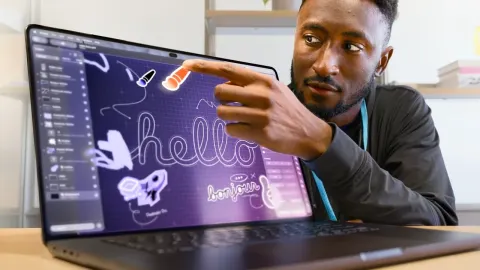
So, I've been testing laptops for over a decade at this point, and not once during that entire time have I thought that touchscreens on a laptop was a particularly good selling feature. It's like not once. And so, it was a surprising moment when Apple launched their new MacBook ProLled product today. And it does in fact have touchscreen. The big thing to me is not in fact the touchscreen, it is the weight. And it's not that the previous one was like super heavy, but we just got used to its weight because we were just like this is what Apple needs to do to get the performance and the thermal qualities that product had. But the fact that we're able to get this kind of weight reduction is very impressive. Now, the
way they achieved that wasn't through just like one single feature. It's weight reduction across the whole manufacturing process. But I think the big one is the thermal design. So, that was something that's like not immediately apparent when you watch the commercial or when you look at it from far away. But you'll notice the venting on this device is quite different than the previous one. It's now just a series of ports right in the middle of the screen. And it's seemingly because they're trying to control the temperature of the screen and not have too much hot air blowing onto it. Uh, and if you look at the side vents where it typically would suck air in, those have also been rounded out a little bit.
They're just a little bit smoother to the touch. And obviously the air flow through the device is going to be different because the top venting is gone. I'm assuming it just goes through the keyboard as the primary like exhaust mechanism. It's a little bit thinner than before and obviously significantly lighter than before. And if you look at the bottom of the device, like the little rubber feet, those seem to be sunken into the device. Like for the previous generation, those would like protrude quite a bit. Uh now these are sunken in so that it just makes the whole Z height of the product even thinner. Now, visually speaking, the external device isn't all that different. Like, the logo glows now, but
if it didn't do that, this would actually be very difficult to tell apart between the old ones and the new ones. Uh, that lighting is not like the back light of the panel like the old school MacBooks with the glowing logos. Those would have been just like the back lighting of the panel just shining through. But this time, because these are OLED, they don't light like that. There is no backlighting. the actual OLED pixels would light up and those would only be visible from the screen side. Now that screen itself, it is a very nice screen. Like that alone, it when I looked at this thing, uh it's a
very obvious and significant upgrade from the current version of the MacBook Pro. It gets very bright and the contrast ratio is unbelievable. Like the blacks are literally black because the pixels aren't even on and there's no blooming because there's nothing to bloom. It's an OLED panel. If you're editing videos, editing photos, for sure you're going to appreciate the screen. Uh, if for whatever reason you play games on it, again, dark scenes will just pop really nicely on the screen. But for like typical web browsing and just, I don't know, regular laptop use, I would argue that most people wouldn't
notice a difference. But technically speaking, it is a significant improvement in screen over the previous generation. Now, in terms of the touch capabilities, I am a little bit torn in terms of how useful it actually is. The demonstrations that they had were neat. Uh, and they had a few like professionals showing off professional workflows that would in theory use the touch capabilities, but it just felt like everything that you would touch it for in terms of just like sheer efficiency that a mouse or a trackpad would just be faster. It is just the nature of indirect inputs, right? But at the same time, because this supports multi-touch, and I think it supports even more than 10 fingers, it could do
things that a mouse could never do. There was a demo from a music producer that was showing off the capabilities of that touch. But for my workflow, like I tried editing a video on it, it felt so awkward. And like I've worked with iPads and other touch devices to try to edit video with and it didn't feel at least not immediately it didn't feel any different from that. So if your workflow for whatever reason like you like to use uh a touch interface for video work or 3D work then this is perfect for you. But I think for the regular workflows for most people I can't imagine them preferring this over again a typical mouse. Now Apple's done a bunch of stuff to make that touch experience as nice as
possible. They have a few animation to kind of make small UI elements get a little bit bigger so that you can interact with it with more precision, but they also have hardware features like the improved hinge that allows the device to be a little bit stiffer when you poke at it so it doesn't wobble as much. It's still one hand openable, but you can tell that the hinge has been tweaked. I'm just in the middle of editing this right now and I realized I forgot to talk about the fingerprint situation. So, looking at the footage here, I tried both the glossy screen as well as the nanoexture screen. Both of them showed fingerprints pretty aggressively. Like obviously this is worst case scenario of a bunch of
random people touching the screen for demos. Uh but it's not like a fingerprintfree situation. At the same time, it's better than I would have expected. There's like a new coating that they're putting on this to reduce the fingerprints that are visible. Now, after using it for a little while at this event, I will say that my hand and my arm did get a little bit tired just like poking at it a lot. This is something that Apple and I guess everyone's talked about the whole gorilla arm thing. I think the better way to look at it is that it's not meant to be the primary way to use this device, right? I think the wrong way to look at it is that Apple's trying to like replace everything with touch
input at this point. I that's clearly not the case here. Uh, it's just one of those things where if you ever want to touch at any UI elements or like manipulate something in a 3D program, you now have the capability to. It's just a feature ad. I don't think it's some crazy improvement to the product. Uh, there's also the new dynamic island instead of the notch on the screen that I think people complained about the notch when it first came out and this new dynamic island thing is it's nice and you can set timers and do other like notifications in that area. Again, a small feature ad that I think just adds to the overall usability and just general experience that you have with
the MacBook Pro, but I don't think it's something worth upgrading because of the most interesting thing to me is the reduction in weight. And I would think for most people who are looking to upgrade to the new products, that would be the thing that draws you to it. It's significant. You hold it, you put in your backpack, you have to carry it around frequently. The weight reduction is very nice. The chips remain the same. It's still the M5 Pro and M5 Max options. There is no M6 kind of pro and max versions yet. A little bit disappointing obviously, but that's just the nature of their chip launches. Uh I do think that this is going to be the it's like the catalyst for people to
upgrade. Like if you think about how many people are still holding on to M1 Pro, M2 Pro, I'm still using an M2 Max product. It's like four years old at this point and I'm perfectly happy with it. But the weight reduction and just like the small features across the board are something that I'm like, hm, maybe this is finally the time to upgrade. And I think that's probably why Apple's doing this because they've had a very tough time trying to convince people to upgrade to those new iterative changes every year cuz like how many people really need faster processes as like the main thing year on year, right? But something like this, I think it pushes them. Now, in terms of the workflows
that I saw that could potentially make use of a touchscreen device, I think for developers that are making apps for either the iPad or iPhones, you now can test all of those apps on the screen of the device, like particularly like the Duo. Imagine you're a developer and you are making a dual screen app. Instead of having to be forced to buy a super expensive phone, you could theoretically get away with just like testing it on just the laptop. I mean, this is obviously a very super expensive laptop as well, but it now has that, you know, so many of Apple's devices have touchcreens now, and to be able to test on device like this, I think it's a nice little feature. Now, in terms of
pricing, these are significantly more expensive than the original uh M1 Pro, M1 Max, MacBook Pros when those launched. Uh, but it's just Apple pricing combined with the creep of component costs like memory and storage bumping up over the years. Uh, these are definitely more expensive than I think anybody would have hoped, but yeah, let's see how these things shake out. Now, I haven't done obviously any proper reviewing or testing on these things. That will be coming in the near future. All right, hope you guys enjoyed this quick first impressions.